
NATS is a messaging and queueing system designed for simplicity and performance. Arroyo includes sources and sinks for Core NATS and NATS Jetstream, which layers on persistence and delivery guarantees.
Configuring the Connection
NATS connections can be created with the Web UI or SQL DDL.
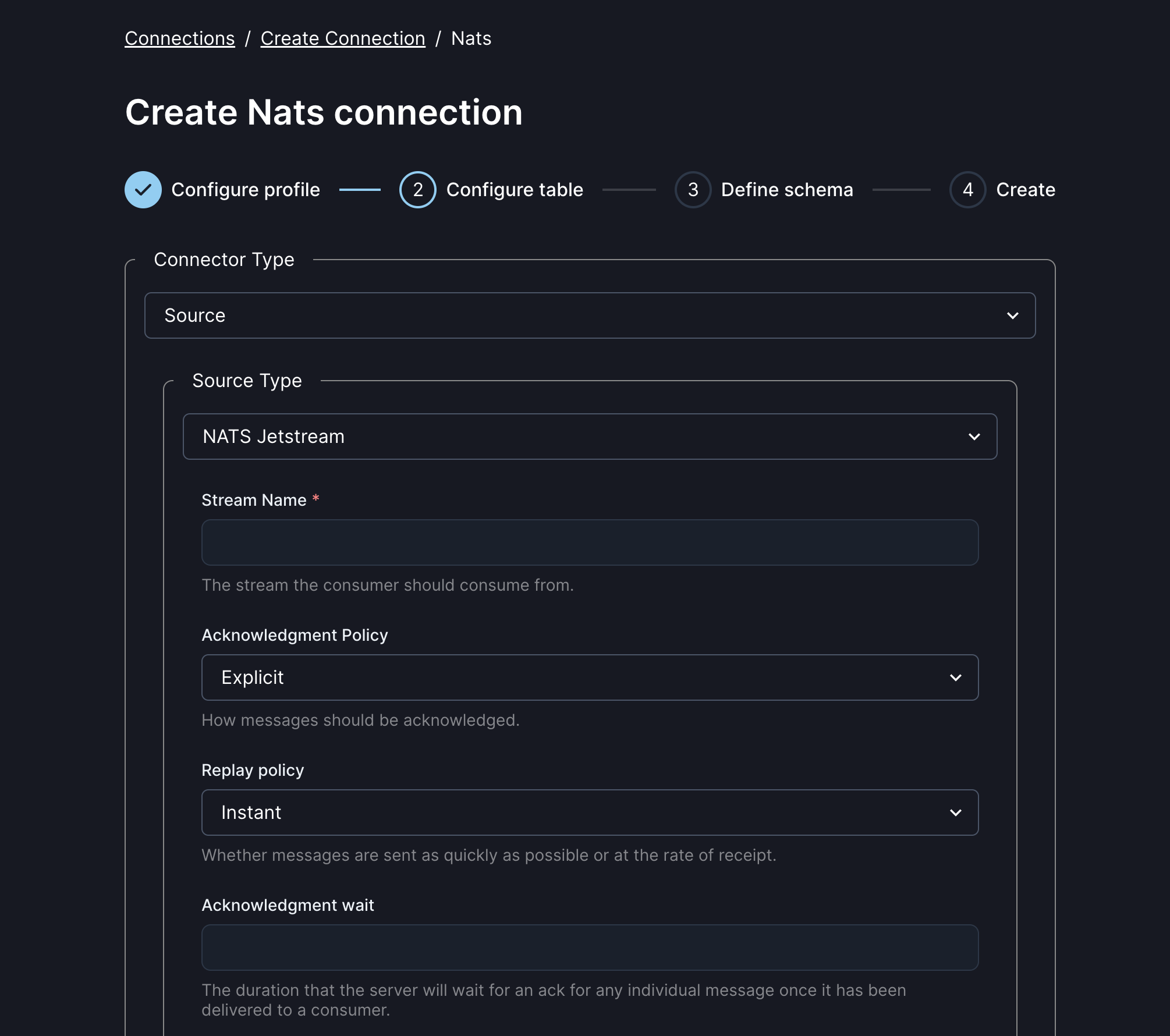
An NATS connection has several required and optional fields:
| Field | Description | Required | Example |
|---|---|---|---|
| servers | Comma-separated list of NATS servers | Yes | nats-1:4222,nats-2:4222 |
| auth.type | One of ‘none’, ‘credentials’, or jqt |
No | credentials |
| auth.username | Username for auth | For auth.type = ‘credentials’ | bob |
| auth.password | Password for auth | For auth.type = ‘credentials’ | hunter2 |
| auth.jwt | JWT token string used for JWT-based authentication with NATS | If auth.type = 'jwt' |
eyJhbGciOiJFZERTQSJ9... |
| auth.nkey_seed | NKEY seed string (private key) used to sign authentication challenges when using JWT-based authentication | If auth.type = 'jwt' |
SUAFK5ZQJXPQ... |
| type | Either ‘source’ or ‘sink’ | Yes | source |
| stream | The NATS stream to read from, for jetstream | One of stream or subject | events-arroyo |
| subject | The Core NATS subject to read or write from | One of stream or subject | events |
| consumer.ack_policy | One of ‘Explicit’, ‘None’, or ‘All’ | No | Explicit |
| consumer.replay_policy | One of ‘Original’ or ‘Instant’ | No | Instant |
| consumer.ack_wait | Duration in seconds that the server will wait for an ack for any individual message once it has been delivered to a consumer | No | 300 |
| consumer.description | Description of the consumer | No | arroyo-consumer |
| consumer.filter_subjects | Comma-separated list of subjects the consumer should filter on | No | events1,events2 |
| consumer.num_replicas | Number of replicas for the consumer’s state | No | 3 |
| consumer.inactive_threshold | Duration in seconds before inactive consumers will be cleaned up | No | 600 |
| consumer.rate_limit | Maximum number of messages per second that will be delivered to consumer (-1 for no limit) | No | 1000 |
| consumer.max_ack_pending | Maximum number of messages without an acknowledgement that may be in flight before sending is paused (-1 for no limit) | No | 1000 |
| consumer.max_deliver | Maximum number of times a specific message delivery will be attempted (-1 for no limit) | No | 20 |
| consumer.max_waiting | Maximum number of messages that can be waiting to be delivered (-1 for no limit) | No | 10000 |
| consumer.max_batch | Maximum number of messages that may be delivered in a single batch | No | 1000 |
| consumer.max_bytes | Maximum number of bytes that will be delivered in a single batch | No | 104857600 |
| consumer.max_expires | Maximum number of messages that can be delivered to the consumer before they are considered expired | No | 30000 |
See the NATS documentation for more explanation of these configurations.
Connection Profiles
Arroyo connectors can split their configuration into two parts: the profile config, which covers the common details of how to connect and authenticate against a cluster, and the table config which is specific to a particular instance of the connector.
For NATS, the profile represents a particular NATS server or cluster, while the table represents a particular subject or stream.
NATS profiles can be defined via the Web UI and shared across multiple tables.
They can be used in SQL DDL by setting the connection_profile option in the WITH
clause.
See the connection profile docs for more details.
Examples
NATS Source
CREATE TABLE logs (
    id BIGINT NOT NULL,
    time TIMESTAMP NOT NULL,
    host TEXT NOT NULL,
    level TEXT NOT NULL,
    message TEXT NOT NULL
) with (
    type = 'source',
    connector = 'nats',
    servers = 'localhost:4222',
    subject = 'logs',
    'auth.type' = 'credentials',
    'auth.username' = '{{ NATS_USER }}',
    'auth.password' = '{{ NATS_PASSWORD }}',
    format = 'json'
);
NATS Sink
CREATE TABLE results (
    count BIGINT NOT NULL,
    time TIMESTAMP NOT NULL
) with (
    type = 'sink',
    connector = 'nats',
    servers = 'localhost:4222',
    subject = 'results',
    format = 'json'
);