---
title: "Kafka"
description: "Use Kafka topics as sources and sinks"
---
> Documentation Index
> Fetch the complete documentation index at: https://www.arroyo.dev/docs/llms.txt
> Use this file to discover all available pages before exploring further.
# Kafka
Arroyo provides sources and sinks for [Apache Kafka](https://kafka.apache.org/)
for consistently reading and writing data from Kafka topics using exactly-once
semantics. Kafka's distributed log model makes it a great fit for stream
processing applications like Arroyo.
Arroyo supports Kafka clusters that are self-hosted, using Amazon
MSK1, and Confluent Cloud.
*1 Note that MSK Serverless is not currently supported due to its
reliance on non-standard IAM authentication*
## Configuring the Connection
Kafka connections can be created via the Web UI or via SQL.
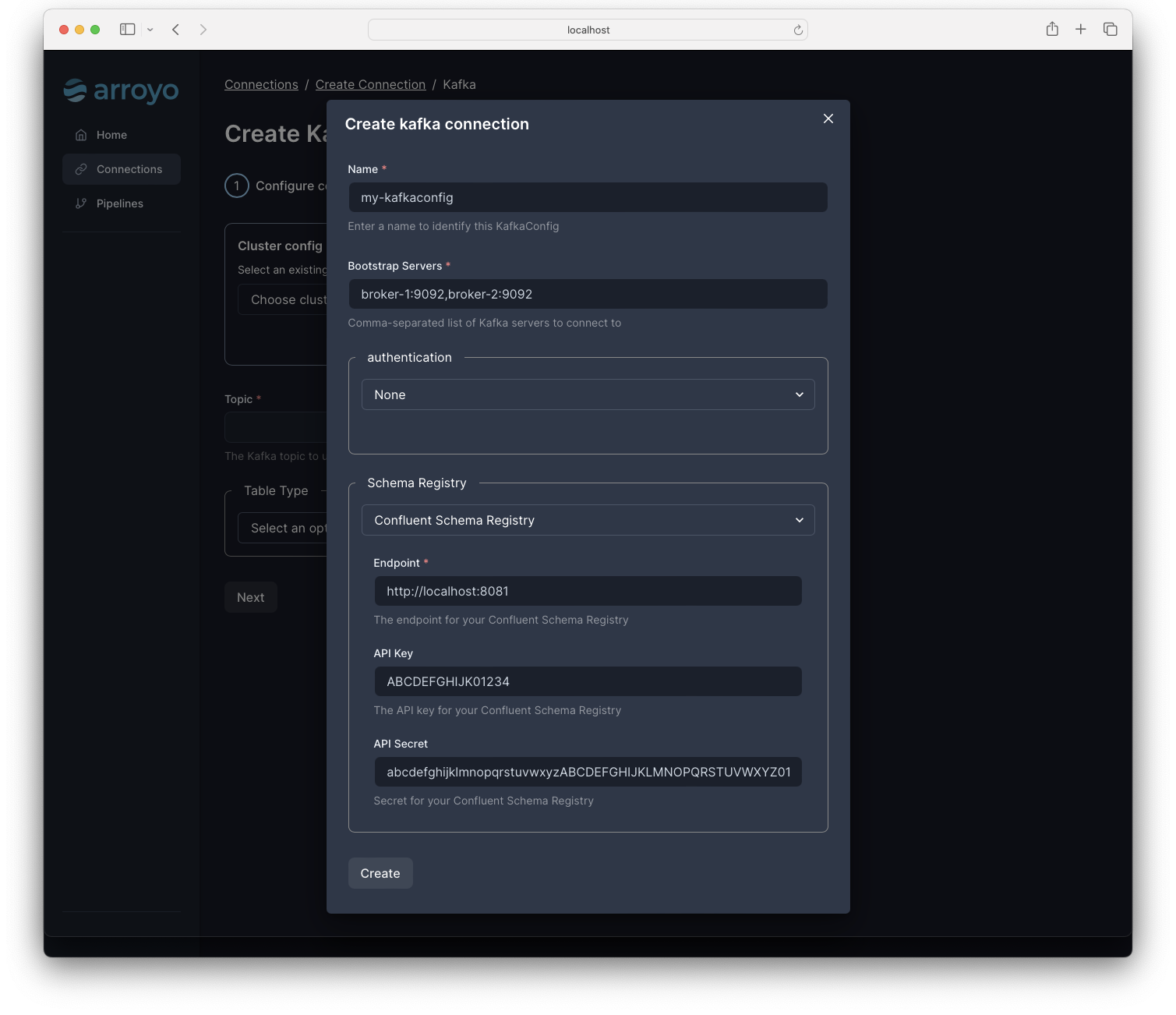 A Kafka connection has several required and optional fields:
| Field | Description | Required | Example |
| ----- | ----------- | -------- | ------- |
| bootstrap_servers | A comma-separated list of Kafka servers to connect to | Yes | `kafka-server-1.cluster:9092,kafka-server-2.cluster:9092` |
| auth.type | One of `none`, `sasl`, or `aws_msk_iam` | No | `sasl` |
| auth.protocol | The SASL protocol to use (e.g., `SASL_PLAINTEXT`, `SASL_SSL`) | No | `SASL_PLAINTEXT` |
| auth.mechanism | The SASL mechanism to use (e.g., `SCRAM-SHA-256`, `SCRAM-SHA-512`) | No | `SCRAM-SHA-256` |
| auth.username | The username to use for SASL authentication | No | `user` |
| auth.password | The password to use for SASL authentication | No | `password` |
| auth.region | The region to use for AWS_MSK_IAM auth | No | 'us-east-1' |
| topic | The name of the Kafka topic to read from or write to | Yes |
| type | The type of table (either 'source' or 'sink') | Yes | `source` |
| value.subject | Configures the value subject read from the schema registry, if enabled | No | `logs-value` |
| source.offset | The offset to start reading from (either 'earliest' or 'latest') | No | `earliest` |
| source.read_mode | The read mode to use. 'read_committed' only reads committed Kafka messages, while 'read_uncommitted' will read all messages. | No | `read_committed` |
| source.group_id | For sources, sets the Kafka consumer group to use; note that using the same group for multiple pipelines will result in each pipeline seeing only a subset of the data | No | `my-group` |
| sink.commit_mode | The commit mode to use (either 'exactly_once' or 'at_least_once') | No | `exactly_once` |
| sink.timestamp_field | The field to use as the timestamp for the Kafka message | No | `timestamp` |
| sink.key_field | The field to use as the key for the Kafka message | No | `key` |
| schema_registry.endpoint | The URL of the Confluent Schema Registry to use | No | `https://schema-registry.cluster:8081` |
| schema_registry.api_key | The API Key to use for the Schema Registry. Will be the username via basic auth | No | `ABCDEFGHIJK01234` |
| schema_registry.api_secret | The API Secret to use for the Schema Registry. Will be the password via basic auth | No | `abcdefghijklmnopqrstuvwxyzABCDEFGHIJKLMNOPQRSTUVWXYZ0123456789` |
| client_configs | Key-value pairs of additional [rdkafka configuration](https://github.com/confluentinc/librdkafka/blob/master/CONFIGURATION.md) options | No | `message.max.bytes=1000,queue.buffering.max.kbytes=1048576` |
## Kafka Sources
Kafka sources can be created via the Web UI, the API, or directly in SQL. A
Kafka source is defined by a topic name and a schema.
Schemas can be defined via json-schema, or automatically configured via
Confluent Schema Registry.
Kafka sources implement exactly-once semantics by storing the last-read offset in Arroyo's state.
Additionally, you can set `source.read_mode` to `read_committed` to ensure that only committed messages are read.
### Source metadata
The Kafka connector supports accessing the following metadata fields:
* `offset_id BIGINT` — the offset of the message
* `partition INT` - the partition of the message
* `topic TEXT` — the topic the message was consumed from
* `timestamp BIGINT` - the record timestamp
* `key BYTEA` - the message key
See the [source metadata](https://www.arroyo.dev/docs/connectors#source-metadata) docs for more on how to use metadata fields.
## Kafka Sinks
Kafka sinks can be created via the Web UI, the API, or directly in SQL. A Kafka
sink is defined by a topic name. Currently, Kafka sinks only support writing
JSON data, with the structure determined by the schema of the data being
written.
The Kafka sink supports both *exactly once* and *at least once* modes.
At least once delivery will proactively write to the downstream Kafka topic
as messages come in. This can potentially result in duplicate messages in the event of a pipeline failure.
Exactly once delivery writes to Kafka using its transaction API.
Data is staged within each epoch of the checkpointing system,
and then committed through a two-phase protocol once all data is staged.
Currently the system does not cleanly recover from failures during the commit phase,
as this requires Kafka to be better able to participate in a two-phase commit.
See [this issue](https://github.com/ArroyoSystems/arroyo/issues/224) for more details.
### Producer metadata
Messages produced to Kafka include data—a sequence of bytes typically encoded in
a format like JSON, Avro, or Protobuf—as well a metadata. The Arroyo Kafka
connector supports setting metadata fields—currently timestamp and key—to
support more powerful integrations. For example:
```sql
create table sink (
timestamp TIMESTAMP NOT NULL,
user TEXT,
event TEXT
) with (
connector = 'kafka',
bootstrap_servers = 'localhost:9092',
format = 'json',
'sink.timestamp_field' = 'timestamp',
'sink.key_field' = 'user',
type = 'sink',
topic = 'events'
);
```
## Kafka DDL
Kafka connection tables can be defined via SQL DDL and used as sources and sinks in
SQL queries.
For example:
```sql
CREATE TABLE orders (
customer_id INT,
order_id INT,
offset BIGINT METADATA FROM 'offset_id',
partition INT METADATA FROM 'partition'
) WITH (
connector = 'kafka',
format = 'json',
bootstrap_servers = 'kafka-server-1.cluster:9092,kafka-server-2.cluster:9092',
topic = 'order_topic',
type = 'source',
'source.offset' = 'earliest',
'source.read_mode' = 'read_committed'
);
```
Source: https://www.arroyo.dev/docs/connectors/kafka/index.mdx