


The Arroyo team is very excited to announce the release of 0.16.0. This release encompasses almost a year of work and over 140 PRs merged, with a focus on scalability, reliability, and performance. This also marks the GA release of Basin Pipelines — Cloudflare’s managed Arroyo service — and reflects the hard-won operational lessons of running the engine at scale across thousands of concurrent pipelines and many GB/s of traffic.
And we’re already hard at work on the next release, 0.17, which we anticipate will be the last before 1.0.
Arroyo is a community project, and we’re happy to welcome a record 9 new contributors in this release:
- @hrushikeshdeshpande made their first contribution in #969
- @oliy made their first contribution in #978
- @garvit-gupta made their first contribution in #985
- @benamartin43 made their first contribution in #981
- @wshirey made their first contribution in #990
- @QnJ1c2kNCg made their first contribution in #1000
- @cluster2600 made their first contribution in #1018
- @aayushn10 made their first contribution in #1074
- @46bit made their first contribution in #1102
Excited to try things out? Getting started is easy with our native packages for Linux and macOS, or with our Docker images and Helm chart:
$ curl -LsSf https://arroyo.dev/install.sh | sh$ arroyo cluster
If you are interested in working on Arroyo full-time, we are hiring for the Pipelines team at Cloudflare. Please reach out here.
And without further ado, to the details of the release!
Table of contents
Features
Worker leader mode
For Arroyo 0.16 we’ve added a new way to run the control plane, which we call worker leader mode, that further decouples the data plane (where pipelines run and process data) from the control plane. This improves reliability of highly multi-tenant deployments, and allows us to run massive numbers of concurrent pipelines (today at Cloudflare, this numbers in the thousands).
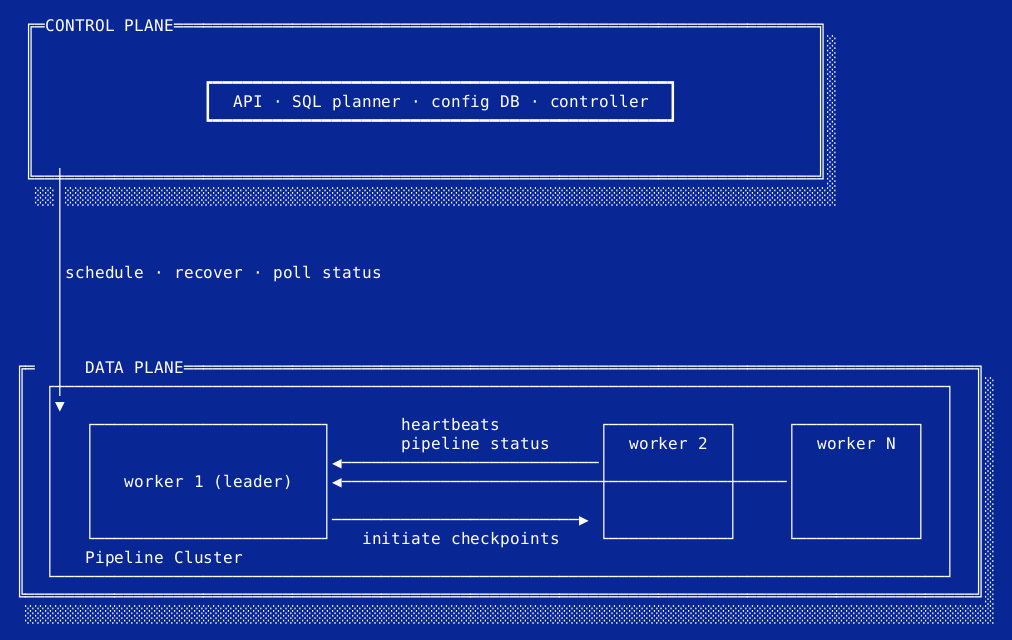
The new Arroyo control plane/data plane architecture, with worker leaders
In the current architecture (which we call job controller mode) the controller process — the control plane — is responsible for actively managing every pipeline; tracking failures, issuing checkpoints, and preventing split-brain. This last responsibility, in particular, means that control plane downtime causes data plane downtime. The new architecture moves most of these responsibilities into one of the pipeline workers (the worker leader) alongside an object store-based checkpoint linearization protocol, breaking this hard dependency on the controller.
This is a sufficiently deep topic that we previously described it in detail in this post.
In Arroyo 0.16, the existing job controller mode remains the default, and worker leader mode can be enabled by setting
job-controller = "worker"in your cluster config. In 0.17 it will become the default.
- #1035 Introduce worker job controller mode mwylde
- #1051 Implement new checkpoint protocol mwylde
- #1055 Support state machine adoption of existing clusters in leader mode mwylde
- #1063 Support checkpoint status API for leader mode mwylde
- #1065 Always advance generation when creating a new cluster in scheduling mwylde
- #1069 Set finish time on checkpoint details in leader mode when committing mwylde
- #1072 Keep leader alive after checkpoint stopping mwylde
- #1075 Add support for metrics in leader mode mwylde
- #1076 Implement checkpoint cleanup for leader mode mwylde
- #1077 Add integration tests for leader mode mwylde
- #1078 Add checkpoint_type to /checkpoints response mwylde
- #1080 Don’t fail in leader mode if job is stopping mwylde
- #1086 Fix checkpoint cleaning failures in leader mode that could starve out checkpointing mwylde
- #1092 When scheduling a leader cluster times out, check for job failure mwylde
- #1101 Speed up recovery in leader mode by bounding attempted leader communication mwylde
- #1112 Support checkpoint GC in leader mode for stateful operators mwylde
- #1118 Add gRPC connect timeout on LeaderManager::connect cmackenzie1
- #1122 Add support for starting/restarting without state in leader mode mwylde
- #1124 Fix race condition that could prevent stopping checkpoint finalization in leader mode mwylde
- #1128 Don’t fail pipelines when checkpointing fails during restart mwylde
- #1137 Allow transitioning from safe restart to force restart in leader mode mwylde
- #1137 Show checkpoint type in web UI mwylde
- #1144 Add timeouts for leader manager calls mwylde
- #1183 Reset worker timeouts after startup succeeds 46bit
- #1195 Fix checkpoint commit replay after downscaling QnJ1c2kNCg
FileSystem Sink v2
The FileSystem sink is one of the most used in Arroyo (and certainly the most complicated). Despite its (somewhat misleading) name, this is the sink used for writing files to object storage and performing transactional ingestion into data lake formats, including Delta and Apache Iceberg. The original implementation served us well for three years. But in 0.16 we’re shipping FileSystem Sink v2, a complete rewrite that offers significant improvements in correctness and performance.
Superficially, writing files to object storage seems like it should be pretty simple. You just upload them, right? But we have some additional requirements that make this a bit harder:
- Events should be able to be ingested with low latency (sub-minute)
- Without writing too many files (which slows down query engines)
- Transactionally (each incoming event should appear exactly once in the output, even if we crash in the middle)
We previously wrote about how we accomplished these goals with the FileSystem sink. This codebase worked, but as we scaled it to thousands of file writes a second, we found several rare correctness bugs. (At scale, any bug in the system will appear for someone.) These sorts of bugs are particularly bad, because they can cause data loss — an absolute no-no for a storage service.
Much of the complexity, and its attendant bugs, came from the ad-hoc system within the operator to achieve parallel writes, necessary to get acceptable levels of throughput. This created effectively a separate timeline that interacted only via message passing with the main consistency system of the engine. Essentially, we’d made a distributed system within the operator and given ourselves all of the challenges of writing correct, transactional distributed systems. Furthermore, this made adding structured error handling (see below) to the sink very challenging.
Fortunately, in the years since the FileSystem sink was originally written, we’ve added some new tricks to Arroyo’s operator framework, including the ability to run work in the background while still operating within Arroyo’s consistency model, using Rust’s async system. After some experiments, we concluded this was sufficient to implement the concurrency needed in the sink, and we decided to write FileSystem Sink v2.
The design is built around a state machine, tracking each file we are in the process of writing (or committing) to object storage. It looks like this:
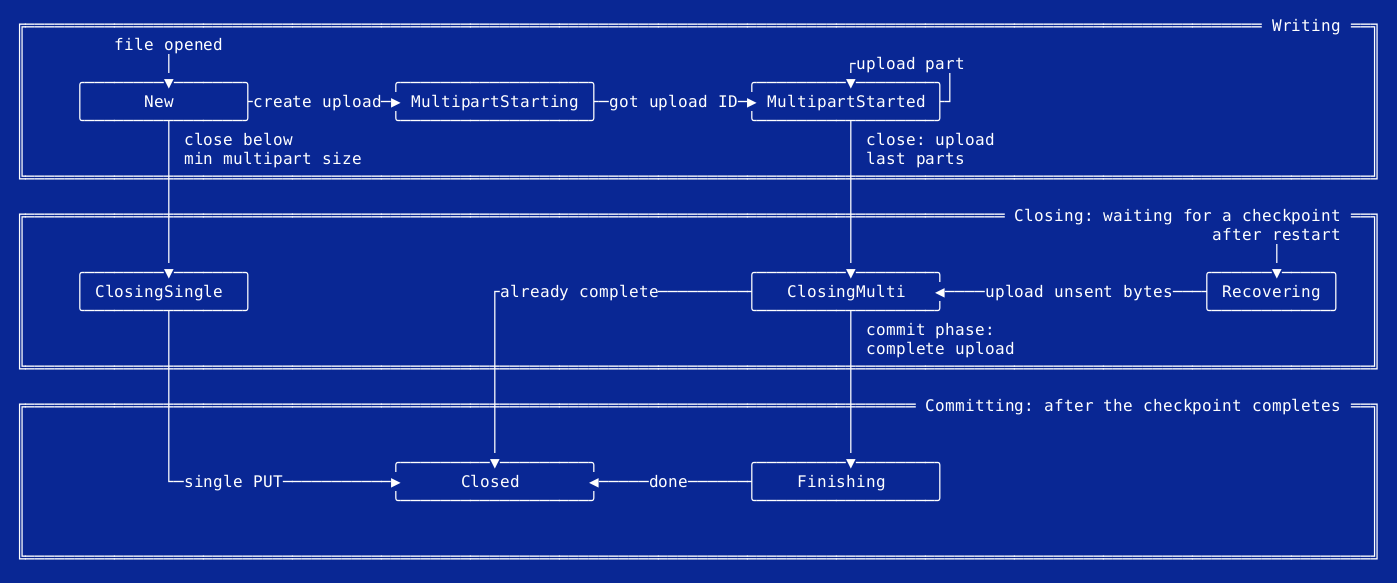
State machines are a powerful tool to achieve correctness. In this case, it operates across the various phases of distributed execution and must be able to be saved and restored from checkpoints and recovered from interruption at any phase. The state machine formalism makes it tractable to analyze each of these possible states and transitions and ensure that we achieve correctness for all.
Beyond the performance and reliability improvements, the FileSystem sink also got a new feature: support for single-request uploads. Previously, all writes would be performed as multipart uploads (MPUs). (In fact, the core trick of the sink is to effectively stage in-progress files as parts of an MPU.) However, for small files committed entirely within a single transactional epoch, this is wasteful. We ended up doing three operations against the object store — starting the multipart, adding the single part, then completing it — when one would suffice. Now, the sink can be configured with multipart.minimum_multipart_size — files smaller than that size will be uploaded with a single PUT request.
V2 has been running in production at huge scale for the past six months and is recommended for all users. In 0.16 it’s enabled by default. You can roll back to the previous version by setting 'sink.version' = 'v1' in the sink configuration.
- #989 Filesystem Sink v2 mwylde
- #996 Add state migration system for operators mwylde
- #997 Improve single-file uploads by not sending contents over the commit RPCs mwylde
- #1027 Address non-idempotent recovery for initiated multiparts mwylde
- #1125 Correctly handle errors while validating existing files in multipart recovery mwylde
- #1135 Default to filesystem v2 mwylde
- #1137 Remove max single part size limit in schema mwylde
- #1168 fix(filesystem): classify recovery auth errors as user failures QnJ1c2kNCg
- #1200 Preserve storage auth errors during multipart recovery QnJ1c2kNCg
- #1218 Tolerate missing multipart outputs for plain-file sinks QnJ1c2kNCg
SQL validation and diagnostics
Arroyo now supports detailed error diagnostics for invalid queries, in both the API and the Web UI. This means instead of getting an unhelpful “No such function COALESE” somewhere in a thousand lines of SQL, we will return the line and column of the error, and highlight it in the editor:
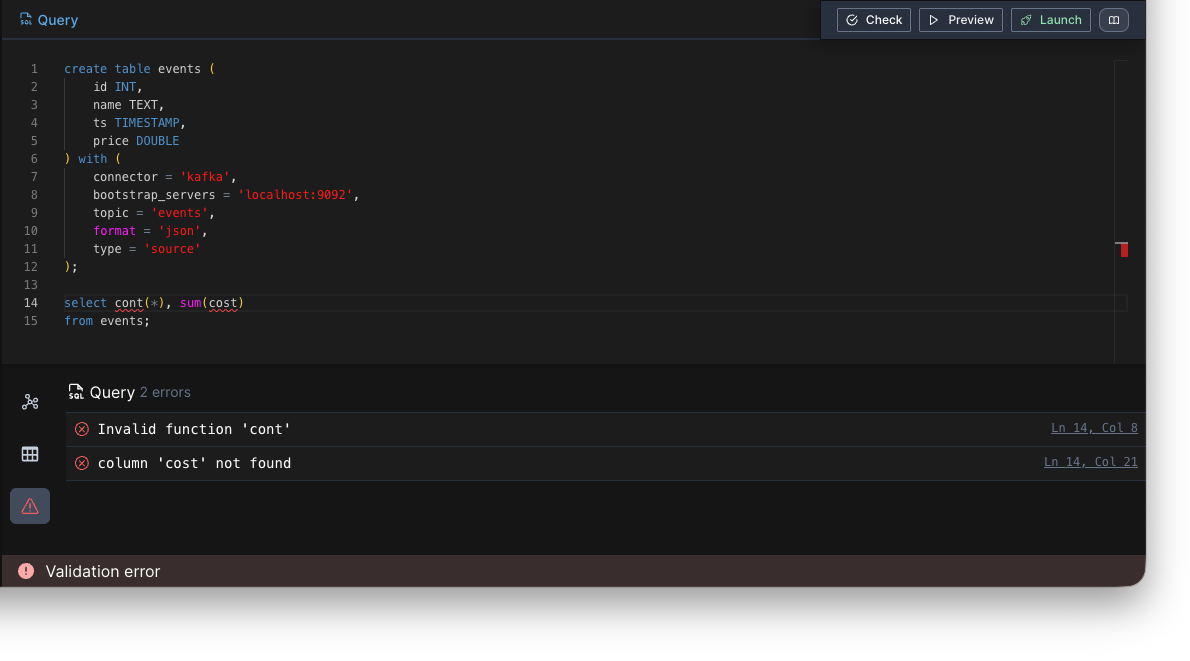
We are also now validating many more possible error conditions at query planning time, rather than run time, allowing you to find problems faster.
- #1120 Validate that ConnectionSchema fields are not duplicated mwylde
- #1121 Report planner error when inserting into sources or selecting from sinks mwylde
- #1123 Add detailed diagnostics for validate_sql API mwylde
- #1133 Validate that user-supplied pipeline IDs are valid path components mwylde
Structured errors
Up until now, Arroyo’s approach to failure handling in the data plane was pretty simple: let it crash. If anything went wrong in an operator, the operator would issue a panic, which would be caught within the operator framework code, and transmitted back to the controller to trigger job recovery. This may not be uh… Rust best practice, but actually it works quite well. By carefully structuring the async task hierarchy, panics are a convenient mechanism to flow the failure through the task graph, organizing shutdown. It’s also very robust, as any unexpected error will also trigger this same mechanism and lead to a clean shutdown.
But there are a few downsides:
- The chain of panics creates a lot of noise in logs, and it can be hard to find the root cause in all of the downstream panics
- We end up relying heavily on specific panic unwinding behavior
- There is no automated way to distinguish different kinds of errors, particularly user-caused errors vs system-caused errors, or within the space of user-caused errors, between data-provoked errors (like a failed CAST) and infrastructural errors, or unexpected panics indicating bugs
The last of which was the main motivation for this work. At Cloudflare we run Arroyo as a managed service, which means that we are responsible for pipelines always operating (and get paged if they ever break). But it turns out there are many ways for a user to break their own pipeline. For example, the user might rotate the key they’ve configured for writing to their R2 bucket. This is a user-caused error that the user must fix, as we don’t have permission to mint a new credential.
On call engineers tend to get cranky when they get woken up for a problem they did not cause and have no way to fix, so we needed to be able to distinguish between these cases.
Now, all error handling within the engine and operator framework relies on structured error handling (in Rust terms, Result). These errors are returned by operators when they cannot continue for some reason; they are handled by the engine machinery, and returned back to the controller to drive reporting and recovery.
Structured errors are visible within the Web UI, returned via the jobs API, and are logged.
For example, if the key for the R2 bucket from the example above is rotated, the FileSystem sink now fails with an error like this one, from GET /v1/pipelines/{pipeline_id}/jobs/{job_id}/errors:
| Error | Domain |
|---|---|
| error in connector: The operation lacked the necessary privileges to complete for path events/2026/11/16/00002-0007.parquet: Error performing PUT … in 84.2ms - Server returned non-2xx status code: 403 Forbidden: … | user |
Because the error is in the user domain and isn’t retryable, the job fails immediately instead of restarting in a loop, and it can be routed to the user rather than to an on-call engineer.
- #970 Structured error handling (part 1) mwylde
- #980 Structured error handling (part 2) mwylde
- #1136 Improvements to structured error handling and propagation mwylde
JSON deserialization errors
When ingesting data into a structured Arroyo table (i.e., one with a schema) Arroyo must validate and parse the incoming data into that structure. For example, if you are reading JSON into a table that has a user_id BIGINT NOT NULL field, the records must have a user_id field that is parseable as an integer. If the data is not valid, there are two options: we can drop the event (prioritizing availability), or we can fail the pipeline so the logic or schemas can be repaired (prioritizing durability).
However, we have not made it particularly easy to see why a record failed to deserialize. In this release, we are improving that by introducing detailed JSON deserialization errors.
JSON sources now report exactly why a record couldn’t be deserialized: which field failed, and whether it was missing, null when the schema requires a value, or the wrong type. With bad_data = 'fail' (the default), the pipeline fails with that error. With bad_data = 'drop', bad records are dropped and counted in the arroyo_worker_deserialization_errors metric, and each failure is emitted as a structured event.
Because these messages end up in logs and the database, they never include the raw value from the record, only its JSON type and length. For example, for a table with the columns user_id BIGINT NOT NULL and age INT NOT NULL:
| Record | Error |
|---|---|
{"age": 31} | field ‘user_id’: required field is missing (expected Int64) |
{"user_id": 42, "age": null} | field ‘age’: null value for non-nullable field (expected Int32) |
{"user_id": "john.doe", "age": 31} | field ‘user_id’: expected Int64, got string (length: 8) |
Deployments with high volumes of bad data can also stop storing dropped-record errors in the database by setting pipeline.store-deserialization-errors = false.
- #985 Capture and report JSON deserialization errors garvit-gupta
- #999 Fix deserialization error counter increment garvit-gupta
- #1010 Redact raw values from deserialization error logging garvit-gupta
- #1011 Add config to disable persisting deserialization errors to DB garvit-gupta
Improvements
Connectors
- #1007 Add support for Gzip compression for JSON on the Filesystem connector, v1 and v2 QnJ1c2kNCg
- #1021 Local JSON compression and optimization for empty encoders QnJ1c2kNCg
- #1024 Output full Iceberg catalog error mwylde
- #1029 Improve Iceberg error mappings mwylde
- #1031 Improve retry mapping logic for Iceberg errors mwylde
- #1032 Make watermark-based file rollover optional, and default to off mwylde
- #1038 Populate snapshot summary stats in Iceberg commits garvit-gupta
- #1056 Add timeouts to Iceberg commit to prevent unbounded checkpoint stalls mwylde
- #1058 Introduce a Postgres TLS config QnJ1c2kNCg
- #1074 Preserve full catalog error messages when they contain quotes aayushn10
- #1141 Classify Iceberg rate limits as external failures QnJ1c2kNCg
- #1170 Run the Iceberg commit in the background mwylde
Engine and control plane
- #971 Add exponential backoff to state retries mwylde
- #988 Retry getting state from remote store oliy
- #991 Retry unhandled panics in data flow mwylde
- #992 Add ignore_state option to pipeline restart garvit-gupta
- #993 Limit number of recovery attempts for task failures mwylde
- #1000 Add retries on failures to fetch/write checkpoints QnJ1c2kNCg
- #1003 Preserve epoch continuity when restarting without state garvit-gupta
- #1033 Refactor out common RPC components mwylde
- #1042 Add configurable Postgres schema for multi-tenant deployments QnJ1c2kNCg
- #1043 Retry transient 409s instead of treating them as user errors garvit-gupta
- #1045 Validate target worker_id on WorkerGrpc RPCs via interceptor garvit-gupta
- #1048 Increase retry counts for scheduler errors to tolerate transient infrastructure outages garvit-gupta
- #1052 Only install pgcrypto if needed QnJ1c2kNCg
- #1053 Add optional state_url and tags to pipelines QnJ1c2kNCg
- #1054 Redact
Sensitive<T>Debug output to avoid leaking secrets QnJ1c2kNCg - #1060 Introduce env_vars column to the job_configs table QnJ1c2kNCg
- #1064 Introduce scheduler_config column to the job_configs table QnJ1c2kNCg
- #1081 Expose pipeline_id in job APIs QnJ1c2kNCg
- #1083 Expose state_url and tags in pipeline APIs QnJ1c2kNCg
- #1084 Move env_vars from the Pipeline API to the Job API QnJ1c2kNCg
- #1089 Add organization_id to StartPipelineReq QnJ1c2kNCg
- #1090 Support updating env_vars and scheduler_config on pipelines cmackenzie1
- #1091 Return to state-machine recovery when retrying individual states fails mwylde
- #1100 Add admin routes for pipelines/jobs scoped by org id mwylde
- #1102 Add bytes-based flushing to source collectors 46bit
- #1107 Allow API CORS behavior to be configured mwylde
- #1111 Support restarting without state in leader mode mwylde
- #1126 Move to cornucopia queries for restart without state mwylde
- #1188 Add bounded retry policies for storage conflicts QnJ1c2kNCg
- #1199 Add retries to Arroyo storage reads and deletes 46bit
Observability
- #978 Use json-subscriber for faster logging and static logging fields oliy
- #1019 Add output-format and table-format labels to filesystem sink trace events garvit-gupta
- #1098 Attribute worker control-loop RPC failures and log message sizes QnJ1c2kNCg
- #1105 Add arroyo-service and pipeline_id to JSON logs QnJ1c2kNCg
- #1110 Don’t include worker_id in the service name in worker logs mwylde
- #1113 Add pipeline_id tag to all pipeline-specific controller logs mwylde
- #1114 Export job state metrics for Prometheus QnJ1c2kNCg
- #1116 Normalize all job_id logs mwylde
- #1132 Log full error chains for analytics and storage errors 46bit
Project infrastructure
- #967 Updates to README mwylde
- #968 Bump version to 0.16.0-dev to start next release cycle mwylde
- #969 Add Semgrep workflow hrushikeshdeshpande
- #987 Update to Rust edition 2024 and Rust 1.92 mwylde
- #990 Fix tutorial link in README.md wshirey
- #1001 Clean up Cargo manifests and address dependency alerts QnJ1c2kNCg
- #1006 Remove unused variable QnJ1c2kNCg
- #1009 Fix various nits and typos QnJ1c2kNCg
- #1012 Update Rust toolchain to 1.93 in CI QnJ1c2kNCg
- #1016 Partially revert cleanup from #1009 QnJ1c2kNCg
- #1018 Fix broken links in README and CONTRIBUTING cluster2600
- #1028 Update Rollup to 4.59.0 mwylde
- #1041 Update Vite to 6.4.2 mwylde
- #1059 Clean up Cargo.toml QnJ1c2kNCg
- #1070 Update CI and Clippy lints to Rust 1.95 mwylde
- #1085 Upgrade web UI dependencies to resolve esbuild, js-yaml, and Vite advisories QnJ1c2kNCg
- #1097 Update rdkafka to 0.39 to fix common macOS CMake builds cmackenzie1
- #1106 Update Kafka URL for CI QnJ1c2kNCg
- #1127 Upgrade js-yaml to resolve Semgrep finding mwylde
- #1139 Upgrade postgres-protocol to 0.6.12 to satisfy Semgrep QnJ1c2kNCg
- #1152 Upgrade js-yaml to 4.3.2 (from 4.3.1) QnJ1c2kNCg
- #1157 Fix udf macro by tagging no_mangle unsafe QnJ1c2kNCg
- #1197 Mitigate eMudhra CA compromise in TLS dependencies and images QnJ1c2kNCg
- #1206 Upgrade to Rust 1.99.1 cmackenzie1
- #1212 Add back support for building on Rust 1.98 mwylde
- #1225 Release udf crates version 0.3 mwylde
Fixes
- #981 Fix local file partitioning file-not-found issue benamartin43
- #1004 Fix bytes calculation in checkpoint_state QnJ1c2kNCg
- #1005 Propagate error during hash computation QnJ1c2kNCg
- #1017 Fix race condition in bounded queue mwylde
- #1020 Hold input queues until ready for shutdown mwylde
- #1057 Return 404 instead of 400 in PATCH pipeline QnJ1c2kNCg
- #1066 Propagate API auth errors instead of panicking QnJ1c2kNCg
- #1071 Stop using serde::__private::ser::FlatMapSerializer QnJ1c2kNCg
- #1108 Prevent massive error messages from exceeding the gRPC limit QnJ1c2kNCg
- #1117 Release job map lock before queue sends cmackenzie1
- #1134 Fix Iceberg truncate transform incorrectly applying bucket mwylde
- #1138 Preserve edge schemas when chaining operators QnJ1c2kNCg
- #1140 Upgrade DataFusion fork to include fix to substr mwylde
- #1143 Prevent single-record batches from
ContextBuffer46bit - #1150 fix(worker): drain and restore async UDF calls correctly QnJ1c2kNCg
- #1184 Validate filesystem sink data sizes and cap parquet buffer preallocation cmackenzie1
- #1196 Make gRPC receive message limits configurable QnJ1c2kNCg
- #1198 Refresh job start time for every execution QnJ1c2kNCg
- #1209 Fix an off-by-one error that caused shuffle-by-partition to send to wrong subtasks mwylde
- #1210 Handle deleted jobs during controller reconciliation QnJ1c2kNCg
- #1211 Increase default gRPC receive limit to 32 MiB QnJ1c2kNCg